Last Updated: October 23, 2026
Quick Summary
Scale service business automation by automating repetitive admin tasks like scheduling, follow-ups, invoicing, and onboarding so you can focus on high-value client work. Document your workflow, identify which tasks waste the most time, then build automated sequences that run consistently without you, freeing hours each week while improving client experience.
- Map your entire service workflow first to identify time-wasting bottlenecks before automating anything
- Start with client onboarding automation as your first project since it’s repetitive, critical, and saves significant hours
- Build automated follow-up sequences that qualify leads by urgency and hand off hot prospects to you within 24 hours
- Set a baseline of current admin hours, response time, and conversion rates to measure whether automation actually works
- Keep the personal expertise and client relationships for yourself, automate only the logistics and reminders
Why Service Businesses Struggle to Scale Without Automation
Here’s the hard truth: most service businesses hit a ceiling around the same place, and scale service business automation is the way through it.
Scale without automation and you hit a wall.
The real fix? Automation. Not to replace you. To free you up.
At AllyONE, we understand the challenges service providers face. The ones who automate the repetitive stuff, scheduling, follow-ups, payments, client onboarding, actually scale.
Step 1: Map Your Current Service Business Workflow
Before you can automate anything, you need to see what you’re actually doing. Most service providers have never written down their workflow.
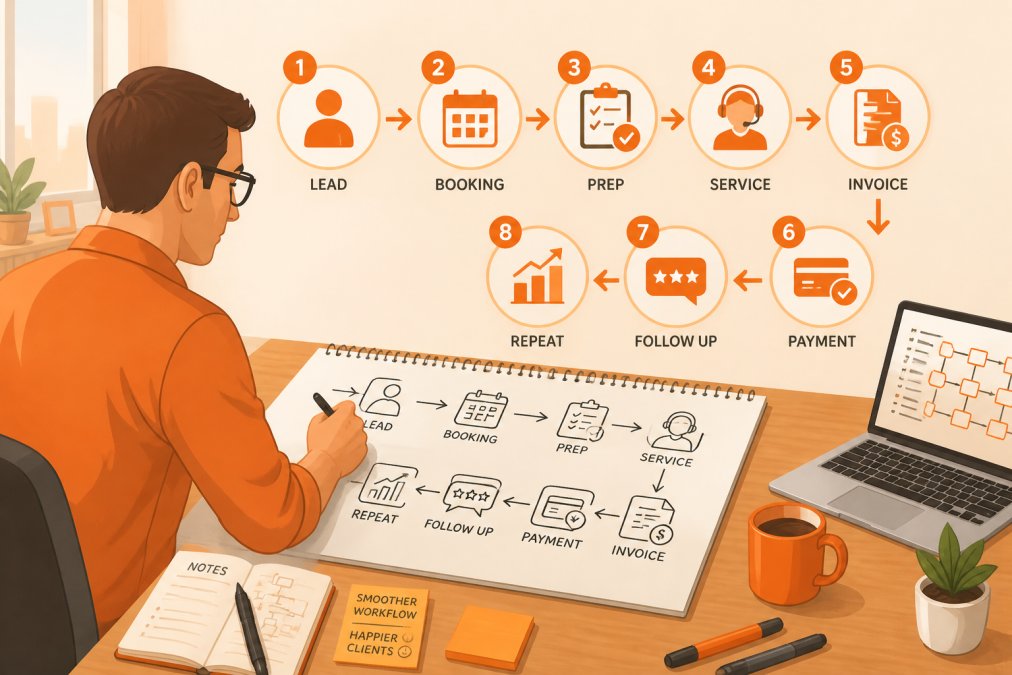
Grab a notebook or open a document. Write down every step from first contact to happy paying client. Don’t skip anything. Include:
- How prospects find you
- How they book a consultation
- What you send them before the first call
This takes an hour or two, but now you can see the whole picture: where you waste time, where clients get stuck, and where the bottlenecks are.
The goal isn’t perfection, it’s clarity. Know what’s happening now so you can decide what to automate next.
Step 2: Identify Which Tasks to Automate First
Not everything needs automation. Your job is to find the tasks that are repetitive, time-consuming, and don’t require a personal touch.
Good candidates for automation:
- Tasks you do the same way every time
- Tasks that eat up hours but don’t move the needle
- Tasks that happen on a schedule
Bad candidates for automation:
- Deep client conversations
- Custom problem-solving
- Building relationships
The sweet spot? Tasks that are manual today but could run on autopilot: appointment reminders, follow-up emails after a consultation, invoice delivery, payment collection, and onboarding sequences.
Start with the tasks that eat the most time and need the least creativity, biggest savings, lowest risk.
Client Onboarding Automation: Your First Quick Win
When someone becomes a client, they need contracts, payment details, access instructions, a welcome call, and a checklist of what happens next.
Automate this sequence:
- Client signs agreement → Automated welcome email goes out immediately
- Email opens → Automated follow-up with payment instructions
- Payment received → Automated onboarding checklist and access details
- 24 hours later → Automated reminder to review materials
- 3 days before first session → Automated prep email with what to expect
This whole sequence runs without you touching it. The client gets consistent, professional communication. You get hours back.
The best part? Clients feel taken care of from day one, know what to expect, and show up prepared, which makes your job easier.
Email Marketing Automation for Service Business Growth
Email marketing automation isn’t about spammy blast emails. It’s about staying in front of people who matter without doing it manually.
Most service providers get this wrong: they either send nothing or everything at once. There’s no middle ground.
Automation lets you stay consistent without the effort. Set up sequences that run on their own:
- Abandoned consultation sequence: Someone booked a call but didn’t show up → Automated follow-up asking if they still want to talk
- Post-service sequence: Client finished working with you → Automated email asking for feedback and referrals
- Inactive lead sequence: Someone downloaded something but never bought → Automated emails keeping you top-of-mind
These sequences do the heavy lifting, keeping your name in front of people, moving leads forward, and asking for referrals while you sleep.
The key is making them personal enough to feel real but automated enough to run without you.
Service Business Workflow Automation: Building Repeatable Systems
This is where most service businesses fall apart. They deliver great work, but differently for every client, so projects take longer, quality varies, and you can’t delegate or scale.
Automation helps in two ways: it documents what you do, and it makes sure it happens the same way every time.
Example: Let’s say you’re a business coach. Your process is:
- Initial consultation
- Business audit
- Strategy session
- Monthly check-ins
- Quarterly reviews
Right now, you’re manually scheduling each step, sending reminders, collecting feedback, and tracking progress. Automate this:
- Consultation → Automated audit questionnaire sent immediately
- Questionnaire returned → Automated reminder to schedule strategy session
- Strategy session scheduled → Automated prep materials sent to client
Now the system runs itself. Every client gets the same high-quality process, you’re not reinventing the wheel each time, and you can delegate parts of it because the system is clear.
Automated Sales Follow-Up: Turn Leads Into Clients
Most leads don’t convert on the first touch. People need time to think and feel confident before they buy. Manual follow-up is exhausting, so most service providers let leads fall through the cracks.
Automated follow-up fixes that, but only if you build it around qualification and handoff. Blasting the same emails at everyone is just spam with better timing; sorting leads and knowing when to tap you on the shoulder is a sales assistant.
Start with a simple qualification step
Before any follow-up runs, capture what the lead needs and how soon. A short form on your booking page does this without feeling like an interrogation. Ask things like:
- What service are you interested in?
- What’s your rough timeline (this week, this month, this quarter, just researching)?
- What’s the best way to reach you?
That’s enough to route people. A lead who says “this week” should not get the same sequence as someone who says “just researching.” One needs a fast human response. The other needs nurturing.
Build two tracks, not one
Hot track (ready soon): Trigger an immediate confirmation email, then a text or email within the hour offering two specific times to talk. If they don’t book within 24 hours, a gentle nudge goes out. If they still don’t book after 48 hours, the system flags you to make a personal call.
Nurture track (not ready yet): Send a slower sequence over two to three weeks. A helpful resource, a short case example, an invitation to a webinar or free audit, and a check-in asking if anything has changed. No pressure, no fake urgency. When they reply or book, the system moves them to the hot track automatically.
The human handoff rule
Here’s the rule that separates a working follow-up system from an annoying one: any reply from a lead should pause the automation and notify you. A real question deserves a real answer from a real person. Automation handles timing and reminders; you handle the conversation. This single rule prevents the “I felt like I was talking to a robot” complaint that kills trust.
A simple sequence that works
- Immediately: Confirmation email with next steps and a booking link.
- Within the hour (hot leads): A second touch offering two specific times.
- Day 2: A short email with proof, such as a testimonial or a before-and-after example.
- Day 4: A helpful resource or a link to your free business audit, depending on what they asked about.
- Day 7: A direct question: “Is now still a good time, or should I check back later?”
- Day 14: A final check-in that makes it easy to say yes, no, or not yet.
Every email should sound like you wrote it, because you did. Automation just decides when it goes out.
What to watch for
Two things go wrong with automated follow-up. First, leads get buried under emails and tune out. Cap your sequence at five or six touches, then stop. Second, hot leads wait too long for a human.
Get those two right and your follow-up stops being a chore. It becomes a quiet system that keeps leads warm, sorts the serious from the curious, and tells you exactly when to step in.
Measure What Matters: Tracking Automation ROI
If you’re not measuring automation, you don’t know if it’s working. Most service providers set it up and hope for the best, never tracking which sequences convert or which tasks actually save time. A few simple numbers tell you exactly where to double down.
Start with a baseline, not a guess
Before you automate anything, write down where you are today. Pick a normal week and track these five numbers:
- Admin hours per week: Roughly how many hours go to email, scheduling, invoicing, and follow-up?
- Lead response time: How long does it take you to reply to a new inquiry?
- Booking conversion: Out of every ten inquiries, how many become booked calls?
Don’t aim for precision. A rough baseline is enough. The point is to have something to compare against later.
Set simple targets
Once you have a baseline, pick one or two targets that matter most to your business. For example:
- Cut admin hours by a few hours a week.
- Respond to every new lead within one business day.
- Move booking conversion up by a few percentage points.
Small, specific targets beat vague goals like “save time.” They also make it obvious when something isn’t working.
A simple ROI calculation anyone can do
You don’t need a finance degree to know if automation is paying off. Use this back-of-the-envelope math:
- Estimate the hours a task takes you each month.
- Multiply by what your time is worth per hour (even a rough number works).
- Subtract the monthly cost of the tool or tools doing that task.
- The result is your rough monthly return.
If the number is positive and the task is off your plate, it’s working. If it’s negative, either the tool is wrong or the task wasn’t worth automating. Either way, you learned something.
Track the metrics that actually move
Not every number deserves a dashboard. Focus on the ones tied to money and time:
- Time saved per week: Hours of admin work you’re no longer doing.
- Lead response time: Faster responses usually mean more booked calls.
- Booking conversion by source: Which channels and sequences turn inquiries into clients.
A simple spreadsheet is enough. The goal is a habit of checking, not a fancy report.
Keep a human in the loop
Measurement isn’t just about numbers, it’s about catching the moments automation gets it wrong. Watch for leads replying with real questions, clients confused by a sequence, or payments that fail silently. A weekly ten-minute review catches anything that felt off. Automation should free your attention, not remove it.
Most service providers find automation increases revenue while decreasing workload: they close more deals because follow-up is consistent and serve clients better because the process is clear. But you won’t know that unless you measure it, or improve it unless you review it.
Frequently Asked Questions
Which tasks should a service business automate first?
Start with repetitive, high-volume tasks that don't require personal judgment: appointment reminders, invoice delivery, welcome emails, and payment processing. These free up your time immediately and show quick wins. Client onboarding automation and email follow-ups are typically next, as they directly impact client experience and revenue without losing the personal touch when it matters most.
How can automation help a service business grow without adding more staff?
Automation handles the administrative overhead that usually requires hiring. When you automate scheduling, invoicing, reminders, and routine follow-ups, you reclaim 10-15 hours per week. That capacity lets you take on more clients, focus on high-value service delivery, or develop new offerings—all without expanding your team. You're working smarter, not just harder.
How do you keep customer service personal when using automation?
Automation should handle logistics, not relationships. Use it for scheduling confirmations, payment reminders, and initial follow-ups. Reserve personalized outreach for milestone moments: first contact, project completion, and renewal conversations. The key is automating the repetitive stuff so you have more mental energy for genuine, one-on-one communication where it actually matters to your clients.
What's the difference between service business workflow automation and email marketing automation?
Service business workflow automation covers your entire operation: scheduling, invoicing, client handoffs, and internal task management. Email marketing automation is one piece of that—it handles prospect nurturing, follow-ups, and customer communication sequences. Both work together: workflows keep your business running smoothly, while email automation keeps prospects and clients engaged without you sending every message manually.